Answer Cloud Visual Voicemail2.3.0
Publisher Description
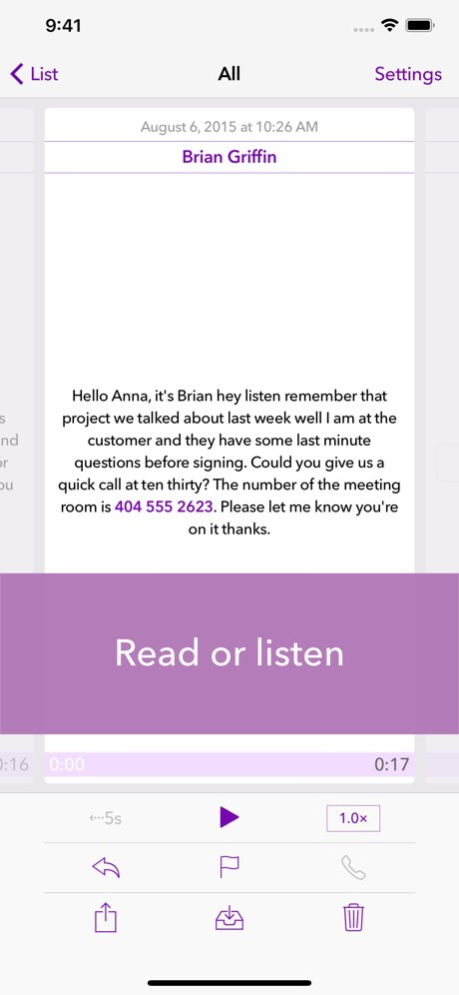


Answer Cloud offers visual voicemail with transcription for your mobile, home, or work phone:
● Read - Voicemails include speech-to-text transcription.
● Export/Copy - Automatically post a copy to Slack or to email.
● Respond - Call back, or reply with text or email.
● Share - Share your voicemails with other apps like Messages, Mail, and more.
Includes push notifications with speech-to-text transcription. Matches incoming calls to your Contacts. Add multiple numbers to have all your voicemail in one place.
FIRST MONTH UNLIMITED FREE TRIAL
Answer Cloud requires a monthly plan, starting at only $0.99/month. Try for one month at no charge with unlimited minutes. See Monthly Plans for details.
READY FOR ORGANIZATIONS, WITH COPY TO EMAIL OR SLACK
Answer Cloud is designed for individual users as well as large and small organizations.
You can set up Answer Cloud to automatically copy voicemails to an email address or a Slack channel.
IMPORTANT
● To use Answer Cloud, you need to forward unanswered calls to your phone number to Answer Cloud. Most phone carriers/plans support this but some, often prepaid plans, do not (e.g., T-Mobile Prepaid, Boost Mobile, or Virgin Mobile). Check with your carrier or support@answer-cloud.com beforehand if you are in doubt. For work numbers, check with your administrator. Detailed forwarding instructions are provided when you sign up in the app.
● Once an unanswered call is forwarded to Answer Cloud, your phone carrier may charge minutes for the forwarded call to Answer Cloud. (Some carriers may also impose an additional charge per forwarded call.) Check with your carrier for details.
● Transcriptions are provided for voicemails in English. Transcription quality depends on many factors and may vary. In some cases, Answer Cloud may not be able to transcribe a message.
MONTHLY PLANS
First month is always free. Subscriptions can be canceled at any time (see Subscription Details below).
● 30 minutes - $0.99/month - for about 1 voicemail a day
● 120 minutes - $2.99/month - for about 2-4 voicemails a day
● 600 minutes - $4.99/month - for up to about 20 voicemails a day
Shared minutes plans available for organizations using Answer Cloud for Work, contact support@answer-cloud.com.
Minutes apply only to calls that result in a voicemail. The maximum length for any call is 2 minutes. Call duration is rounded up to the nearest 30 seconds. Missed calls are not charged.
During the free trial or while you have a paid plan, Answer Cloud allows a single "grace" month with unlimited minutes for individual use (defined as 900 minutes or about 900 voicemails). Repeat overage requires upgrading to a larger plan.
SUBSCRIPTION DETAILS
You are not charged for the first trial month offered when you start using Answer Cloud. Your subscription automatically renews at the end of the subscription period, unless you cancel at least 24 hours before the end of the current subscription period. Your iTunes account is charged for renewal within 24 hours prior to the end of the current period at the above rates.
Manage or cancel subscriptions in Account Settings on your phone (tap Settings > iTunes & App Store > Apple ID > Subscriptions) or by tapping Manage Subscription in the Answer Cloud app. You can cancel automatic renewal at any time but you cannot cancel the current subscription period once it has started.
Near the end of the trial month, Apple will notify you via email that you are about to be charged for the first time. This email includes a link to cancel the subscription.
If you cancel, you will be able to use your remaining minutes until the end of the subscription period. You will be able to access your voicemails and missed calls stored in Answer Cloud for 3 months after the end of your subscription.
TERMS OF USE
Answer Cloud's Terms of Use can be found at: https://www.answer-cloud.com/terms
PRIVACY POLICY
Answer Cloud's Privacy Policy can be found at: https://www.answer-cloud.com/privacy
Version History Added Dark Mode for iOS 13.
Minor bug fixes and improvements.
Includes a fix for a problem with push notifications that affected some users. 2.3.0 09/26/2019 Improved screen layouts for larger size screens.
Minor bug fixes and improvements. 2.2.0 09/10/2019 Updates for iOS 11.
Minor updates for Cisco Spark.
Improved support options for users that are low on minutes. 2.1.6 09/20/2017 Fixes a problem where restoring a previous subscription purchase leads to an unexpected result.
Adds support for push notifications when a subscription expires while the service is still in use. 2.1.5 07/06/2017 Fixes a problem with new users encountering a confusing message during sign-up. 2.1.4 07/04/2017 Improved error handling when purchasing a new subscription or restoring previous subscription purchases.
Resolves an intermittent problem that happened during initial sign-up, or during later sign-ins on a new device. 2.1.3 06/28/2017 Fixed problem with restoring/signing in on latest iOS release.
Minor improvements and fixes. 2.1.2 05/11/2017 For users that have used all the minutes in their plan, or whose subscription has expired, the Settings and Subscription pages now reflect the grace minutes granted by Answer Cloud.
Minor fixes and improvements. 2.1.1 02/16/2017 For Cisco Spark users, Answer Cloud can now automatically post new voicemails to a selected Spark room.
(See www.ciscospark.com: Everything teams need for messages, meetings, and calls. Always available. And the only one backed by Cisco security and reliability.)
Improved and updated instructions for call forwarding to Answer Cloud.
Improved options to contact Answer Cloud Support via email.
In the Settings and Subscription screens, the presentation of remaining minutes is improved.
Various smaller improvements and bug fixes. 2.1.0 02/08/2017 New "Copy to Email" feature lets you receive a copy of your voicemails via email.
Use it manually for a single voicemail, or turn on Automatic Copy to receive an email copy of each new voicemail.
In the voicemail transcription, tap any phone number to call it, or "tap and hold" for more options.
In the voicemail details screen, the controls are now all icon based.
The "Numbers" screen is renamed to "Settings".
App icon, label, and splash screen are updated to reflect the new "Answer Cloud" branding. 2.0.0 12/07/2016 Voicemails with transcription are now automatically marked as "read" when viewed for 2 seconds. (No changes for voicemails with no transcription and for missed calls: as in earlier releases, they are marked as read when viewed.)
Also, a dedicated "Mark" button is added to the details view, to Mark as Read or Mark as Unread.
Various small improvements and bug fixes. 1.4.0 10/11/2016 Minor updates for iOS 10.
Minor bug fixes. 1.3.1 09/16/2016 Support for Puerto Rico phone numbers (requires forwarding of unanswered calls to US mainland number).
Minor bug fixes and improvements. 1.3.0 06/28/2016 Slack integration:
Slack users can now set up Answer to automatically post missed calls and voicemails to the Slack channel of their choice.
In the Slack channel, the relevant call details including transcription, are posted, as well as a link to the audio recording for voicemails.
Also included: various improvements and bug fixes. 1.2.2 04/26/2016 More minutes, lower prices!
With this release Answer introduces new monthly plans, including a new $0.99/month plan. Also, Answer does no longer charge for missed calls (i.e., calls that are forwarded to Answer but do not result in a voicemail). Finally, Answer now allows exceeding a plan's minutes in one month, during the free trial month or during a paid subscription. See product description for details.
Current users can switch to a new plan with more minutes for the same price (contact support@nsr.io for assistance if needed). Current users with a 120 minutes/month plan can keep their plan and automatically enjoy a lower price of $2.99/month.
This release makes it easier for new users to sign up with three clear plan choices. Includes "Learn more" links with detailed answers to frequently asked questions.
Also included: minor bug fixes and improvements. 1.2.1 12/23/2015 Now easily share a voicemail or missed call via Mail, Messages, or any other app available on the "share" sheet on your iPhone.
Depending on the app, the audio recording, the call details (including transcription), and/or a subject line are shared with the selected app.
You can also copy the call details to the clipboard, to paste it anywhere.
In Search, minor improvement and fixes when deleting a search value or canceling search with Cancel. 1.2 12/02/2015 Updated placeholder text in Search field to highlight "tap and hold" option for filtering.
"Cancel" button for Search field to cancel any active search with a single tap.
In activation wizard, added more information to highlight and explain the free month trial.
Minor bug fixes and improvements. 1.1.1 11/18/2015 Use a contact's phone numbers or email addresses when you respond to a call from a known caller:
- Tap Call and select any phone number to return the call
- Tap Reply and select any mobile number (for a text reply) or email address (for email reply).
In call details, tap the caller ID or contact name to call back.
In the list view, touch and hold the Search field to find:
- All unread (not played) missed calls and voicemails
- All read (played) missed calls and voicemails
- All missed calls
- All voicemails.
In call details, tap the caller ID or contact name to search for all other voicemails and missed calls from that number or contact.
When uploading Contacts data:
- Feedback on how many contacts were uploaded
- An option to view and remove the uploaded data, via the linked Privacy Policy web page.
Bug fixes and improvements. 1.1.0 11/09/2015 1.0.3 10/05/2015
About Answer Cloud Visual Voicemail
The company that develops Answer Cloud Visual Voicemail is Cloud App Labs BV. The latest version released by its developer is 2.3.0.
To install Answer Cloud Visual Voicemail on your iOS device, just click the green Continue To App button above to start the installation process. The app is listed on our website since 2026-10-06 and was downloaded 3 times. We have already checked if the download link is safe, however for your own protection we recommend that you scan the downloaded app with your antivirus. Your antivirus may detect the Answer Cloud Visual Voicemail as malware if the download link is broken.
How to install Answer Cloud Visual Voicemail on your iOS device:
- Click on the Continue To App button on our website. This will redirect you to the App Store.
- Once the Answer Cloud Visual Voicemail is shown in the iTunes listing of your iOS device, you can start its download and installation. Tap on the GET button to the right of the app to start downloading it.
- If you are not logged-in the iOS appstore app, you'll be prompted for your your Apple ID and/or password.
- After Answer Cloud Visual Voicemail is downloaded, you'll see an INSTALL button to the right. Tap on it to start the actual installation of the iOS app.
- Once installation is finished you can tap on the OPEN button to start it. Its icon will also be added to your device home screen.
Program Details
System requirements
Download information
Pricing
Version History
version 2.3.0
posted on 2026-10-06
Version History Added Dark Mode for iOS 13.
Minor bug fixes and improvements.
Includes a fix for a problem with push notifications that affected some users. 2.3.0 09/26/2019 Improved screen layouts for larger size screens.
Minor bug fixes and improvements. 2.2.0 09/10/2019 Updates for iOS 11.
Minor updates for Cisco Spark.
Improved support options for users that are low on minutes. 2.1.6 09/20/2017 Fixes a problem where restoring a previous subscription purchase leads to an unexpected result.
Adds support for push notifications when a subscription expires while the service is still in use. 2.1.5 07/06/2017 Fixes a problem with new users encountering a confusing message during sign-up. 2.1.4 07/04/2017 Improved error handling when purchasing a new subscription or restoring previous subscription purchases.
Resolves an intermittent problem that happened during initial sign-up, or during later sign-ins on a new device. 2.1.3 06/28/2017 Fixed problem with restoring/signing in on latest iOS release.
Minor improvements and fixes. 2.1.2 05/11/2017 For users that have used all the minutes in their plan, or whose subscription has expired, the Settings and Subscription pages now reflect the grace minutes granted by Answer Cloud.
Minor fixes and improvements. 2.1.1 02/16/2017 For Cisco Spark users, Answer Cloud can now automatically post new voicemails to a selected Spark room.
(See www.ciscospark.com: Everything teams need for messages, meetings, and calls. Always available. And the only one backed by Cisco security and reliability.)
Improved and updated instructions for call forwarding to Answer Cloud.
Improved options to contact Answer Cloud Support via email.
In the Settings and Subscription screens, the presentation of remaining minutes is improved.
Various smaller improvements and bug fixes. 2.1.0 02/08/2017 New "Copy to Email" feature lets you receive a copy of your voicemails via email.
Use it manually for a single voicemail, or turn on Automatic Copy to receive an email copy of each new voicemail.
In the voicemail transcription, tap any phone number to call it, or "tap and hold" for more options.
In the voicemail details screen, the controls are now all icon based.
The "Numbers" screen is renamed to "Settings".
App icon, label, and splash screen are updated to reflect the new "Answer Cloud" branding. 2.0.0 12/07/2016 Voicemails with transcription are now automatically marked as "read" when viewed for 2 seconds. (No changes for voicemails with no transcription and for missed calls: as in earlier releases, they are marked as read when viewed.)
Also, a dedicated "Mark" button is added to the details view, to Mark as Read or Mark as Unread.
Various small improvements and bug fixes. 1.4.0 10/11/2016 Minor updates for iOS 10.
Minor bug fixes. 1.3.1 09/16/2016 Support for Puerto Rico phone numbers (requires forwarding of unanswered calls to US mainland number).
Minor bug fixes and improvements. 1.3.0 06/28/2016 Slack integration:
Slack users can now set up Answer to automatically post missed calls and voicemails to the Slack channel of their choice.
In the Slack channel, the relevant call details including transcription, are posted, as well as a link to the audio recording for voicemails.
Also included: various improvements and bug fixes. 1.2.2 04/26/2016 More minutes, lower prices!
With this release Answer introduces new monthly plans, including a new $0.99/month plan. Also, Answer does no longer charge for missed calls (i.e., calls that are forwarded to Answer but do not result in a voicemail). Finally, Answer now allows exceeding a plan's minutes in one month, during the free trial month or during a paid subscription. See product description for details.
Current users can switch to a new plan with more minutes for the same price (contact support@nsr.io for assistance if needed). Current users with a 120 minutes/month plan can keep their plan and automatically enjoy a lower price of $2.99/month.
This release makes it easier for new users to sign up with three clear plan choices. Includes "Learn more" links with detailed answers to frequently asked questions.
Also included: minor bug fixes and improvements. 1.2.1 12/23/2015 Now easily share a voicemail or missed call via Mail, Messages, or any other app available on the "share" sheet on your iPhone.
Depending on the app, the audio recording, the call details (including transcription), and/or a subject line are shared with the selected app.
You can also copy the call details to the clipboard, to paste it anywhere.
In Search, minor improvement and fixes when deleting a search value or canceling search with Cancel. 1.2 12/02/2015 Updated placeholder text in Search field to highlight "tap and hold" option for filtering.
"Cancel" button for Search field to cancel any active search with a single tap.
In activation wizard, added more information to highlight and explain the free month trial.
Minor bug fixes and improvements. 1.1.1 11/18/2015 Use a contact's phone numbers or email addresses when you respond to a call from a known caller:
- Tap Call and select any phone number to return the call
- Tap Reply and select any mobile number (for a text reply) or email address (for email reply).
In call details, tap the caller ID or contact name to call back.
In the list view, touch and hold the Search field to find:
- All unread (not played) missed calls and voicemails
- All read (played) missed calls and voicemails
- All missed calls
- All voicemails.
In call details, tap the caller ID or contact name to search for all other voicemails and missed calls from that number or contact.
When uploading Contacts data:
- Feedback on how many contacts were uploaded
- An option to view and remove the uploaded data, via the linked Privacy Policy web page.
Bug fixes and improvements. 1.1.0 11/09/2015 1.0.3 10/05/2015
version 2.3.0
posted on 2019-09-26
Added Dark Mode for iOS 13.
Minor bug fixes and improvements.
Includes a fix for a problem with push notifications that affected some users.
version 2.3.0
posted on 2019-09-26
Sep 26, 2019 Version 2.3.0
Added Dark Mode for iOS 13.
Minor bug fixes and improvements.
Includes a fix for a problem with push notifications that affected some users.
version 2.3.0
posted on 2019-09-26
26 sept. 2019 Version 2.3.0
Added Dark Mode for iOS 13.
Minor bug fixes and improvements.
Includes a fix for a problem with push notifications that affected some users.
version 2.0.0
posted on 2015-10-10
version 2.3.0
posted on 1970-01-01
2019年9月26日 Version 2.3.0
Added Dark Mode for iOS 13.
Minor bug fixes and improvements.
Includes a fix for a problem with push notifications that affected some users.
